#7. Marketing Automation: Taking A Moment To Celebrate Your Successes

By Bob Hebeisen


multitasking-pixabayPart 7 of 7…
Here are 7 ways Marketing Automation helps marketers multitask more effectively:#1. Setting up marketing campaigns for appropriate tracking
#2. A/B testing
#3. Integration with CRM
#4. Lead nurturing for better lead quality
#5. Doing the little things right, automatically
#6. Reviewing results and applying your learning
#7. Taking a moment to celebrate your successes

Marketing is a tough job because there are few opportunities to be the hero and lots of opportunities to be the goat. Continue reading

Posted in Hubspot, Marketing Automation, Marketing Planning | 6 Comments

3 Things An Indie Rocker Can Teach Us About Content Marketing

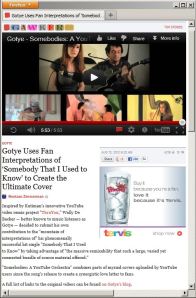
Gawker.com: Gotye Uses Fan Interpretations of ‘Somebody That I Used to Know’ to Create the Ultimate Cover

Gawker.com: Gotye Uses Fan Interpretations of ‘Somebody That I Used to Know’ to Create the Ultimate Cover

By Bob Hebeisen

I clicked to a great post today on Gawker.com entitled “Gotye Uses Fan Interpretations of ‘Somebody That I Used to Know’ to Create the Ultimate Cover.”

Gotye (aka Wouter “Wally” De Backer) is the musician/singer/song-writer responsible for the popular indie rock hit “Somebody That I Used To Know.”  When he published his music video on YouTube, his fans loved it so much that many of them published “responses” to his video where the fans sang and/or played their own interpretations of Gotye’s song.

What Gotye did that was so brilliant is he then took a bunch of those interpretations, sampled them, and spliced them together into what Gawker is calling “the ultimate cover” version of the popular song.  And it really is quite amazing!

It struck me that there are a number of content marketing best practices at play here:

1. Re-tread existing content to freshen up stale subject matter

The original song is terrific, sort of the the 2011 equivalent to Human League’s “Don’t You Want Me.”  I loved it when it first came out.  But to be honest with you, the original song and the popular dance radio remix have gotten so much radio play that I am kind of sick of it now.  I often find myself changing channels when it comes on the radio.  But I took a chance and clicked the play button on the Gawker article, and I’m glad I did because I really couldn’t keep my eyes off it once it started playing.

In the marketing world, you can re-tread existing content to use it in many different ways.  For example…

  • Conduct a live webinar.  Promote the webinar and drive leads by asking viewers to register.
  • Post the webinar slide presentation on SlideShare.
  • Record the webinar and post it on your YouTube channel.
  • Be sure to type up a transcript of the webinar and post it on your website and in the YouTube description for maximum SEO value.
  • Put a landing page on your website with a lead capture form in front of the recorded webinar and then do lead generation email marketing and social media marketing to drive people to the landing page.
  • Blog about the webinar you conducted. Maybe do a series of blog posts one for each major point you made in the webinar.
  • Take the same webinar content and presentation deck and use it to create a white paper or e-book.
  • Create a landing page with a form and then do lead generation activities to promote the white paper or e-book.

Re-treading your content — publishing it in many different formats as described above — allows you to extend the life of the content you create, just like re-treading a tire allows you to extend the life of tires that are worn out.  It also provides massive SEO value, and gives your prospects the opportunity to consume your information in whatever format they prefer.

2. Distribute the burden of content creation

Content creation is hard (even if you are epically creative like Gotye).  Don’t go it alone.  What Gotye has done here is essentially he has leveraged content created by others and published it as something unique and interesting.

You can apply this concept in the Marketing world in a couple of ways.  First, get as many people in your organization as possible involved in content creation.  Look at how many different authors there are on the HubSpot and ConstantContact blogs.  They’ve done a great job of mobilizing everyone in their organization into an army of content creators.  This ensures they have a steady volume of blog posts, infographics, e-books, tweets, etc.  And it also gives employees the opportunity to be the stars, to showcase their knowledge, and to build their own personal brands.

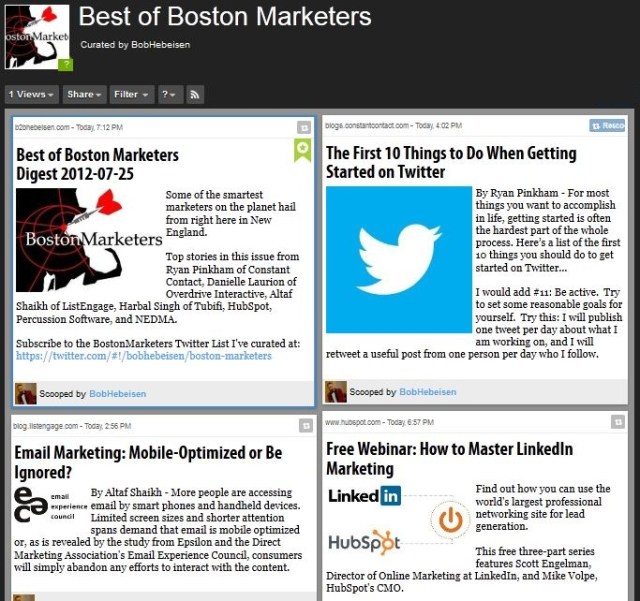
Another way to distribute the burden of content creation is through content curation.  Source the best articles on a particular subject matter created by others, and put them together in a magazine-style blog post.  Here’s an example of content curation I created recently: Boston Marketers Digest.

3. Thank and acknowledge your followers and fans

Gotye provided full credits for the content he used to create his mash-up on his own blog.  Imagine how thrilled his fans must be to see their own tributes to Gotye used like this by the artist they love!  This is a great example of what I call social media currency at work.  We all want to see our content acknowledged with comments, likes, shares, retweets, etc.  And it is an exercise in reciprocation: do unto others as you would have them do unto you.

So please go ahead and share this blog post, and I will be sure to thank you for it and I will reciprocate if I can!

Posted in Blog, Content Curation, Content Marketing, Lead Generation, Search Engine Marketing, Webinar Marketing | Leave a comment

BostonMarketers Digest 2012-07-25

BostonMarketersBy Bob Hebeisen

Some of the smartest marketers on the planet hail from right here in New England.

Top stories in this issue from Ryan Pinkham of Constant Contact, Danielle Laurion of Overdrive Interactive, Altaf Shaikh of ListEngage, Harbal Singh of Tubifi, HubSpot, Percussion Software, and NEDMA.

Subscribe to the BostonMarketers Twitter list I’ve curated.

Click to view this issue Boston Marketers Digest

I used a content curation tool called scoop.it to create this issue, let me know what you think.

Posted in BostonMarketers, Content Curation, Email Marketing, Facebook, Hubspot, LinkedIn, Marketing Automation, Twitter, Video Marketing | 1 Comment

How To Automate Social Media Marketing with HubSpot

By Bob Hebeisen

I just finished ghost-writing a 5-part blog for Tubifi and then I was heading out on vacation.  So instead of delaying the blog post until my return, and instead of posting it without any social media support, I decided to use HubSpot’s Social Media Publishing tool to automate some posts to promote the content and drive traffic.  Here’s how I did it.

1. Post the blog

As I mentioned, it was a 5-part blog (“…5 Items On My Wish List“).  So I considered two options:

  • Posting each of the 5 parts separately (spaced out by a day or so), or
  • Posting it all at once

I decided to post it all at once.  Here are the pros & cons of that decision (let me know if I missed anything):

 Pros:

  • Easier to do all the WordPress work at once.
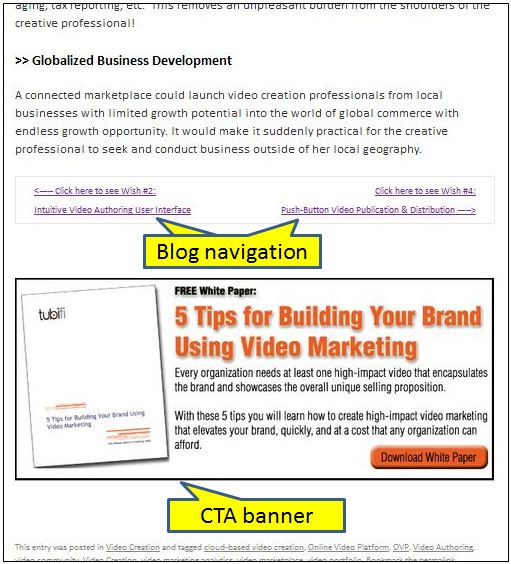
  • Custom navigation and CTA at the bottom of each blog post in the 5-part series.

    I was able to build navigation within each blog post to allow visitors to navigate easily from wish list item to wish list item (see image).  Posting each wish one-by-one would have made it difficult for visitors to consume all the content because they would have had to remember to come back tomorrow for the next wish to be published.

  • Even though it was all posted at once, you will see I employed a strategy that spread out social media promotion over the course of a week or so.

Cons:

  • Google favors websites that have a regular, frequent schedule of updates, which is definitely something we struggle with.  If I had spaced out the publication of each of the 5 posts Google probably would have favored it with slightly higher “SEO juice.”

I was careful to also include a CTA banner at the bottom of each post to try to convert readers to leads.  HubSpot has good CTA (“Call To Action”) functionality where you can test 2 or more offers against one another to see which one pulls better.  Set it up in HubSpot, then paste the code onto any page, and then track the results.  So you will see in the image that the CTA code generated by HubSpot is testing a banner for a free white paper vs. a banner for a free recorded webcast (FYI the white paper is pulling better on the blog but the webcast is pulling better on the home page).

2. Brainstorm tweets and status updates

HubSpot’s Social Media Publishing tool does allow you to compose your tweets and status updates, but I find if I am brainstorming multiple messages it is easier to work offline, compose them all, and then go in and copy/paste them into the scheduling tool.
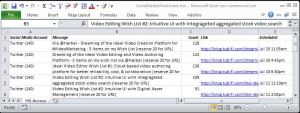
FREE DOWNLOAD: Worksheet for composing Social Media tweets & status updates

I use a spreadsheet to compose my messages, it has a function [=LEN()] that calculates the number of characters used so I know if I’ve exceeded the 140 character limit for Twitter.  I’ve attached the spreadsheet here – FREE DOWNLOAD – in case you want to download it and use it yourself.

3. Input into HubSpot Social Media Marketing tool

I wound up with about 20 different messages to promote the blog series (see attached spreadsheet – FREE DOWNLOAD).  Then I went into the HubSpot Social Media Marketing tool and started cutting and pasting them and choosing dates and times for their publication.  I spread out the promotion for more than 1 week and it really gave me a chance to highlight multiple points, relevant to multiple personas within our target market.

Your hyperlinks are automatically shortened to 20 characters and HubSpot creates a tracking link for them so you can track the number of clicks that result from each message.

You can publish to any of your connected Social Media accounts.  I usually set it up to publish the same message to our Twitter account, Facebook page, and to my personal LinkedIn profile. (Why my personal profile?  See limitations below.)  Then I click “save” and then go back in and edit the Facebook and LinkedIn post to lengthen and clarify the language slightly (i.e. get rid of the “caveman speak” that Twitter’s 140 character limitation sometimes forces you to use) and remove any Twitter hashtags (I think they look obnoxious when you include them in Social Media other than Twitter and just tip your hand that you are broadcasting a message in multiple channels).

You can choose the thumbnail picture associated with the post from any picture file at the destination URL (would be nice if you could also upload a thumbnail).  You can edit the preview text associated with the destination URL, which is very handy.

Limitations:

  • Facebook EdgeRank penalizes 3rd party posting tools, so you will not get as many viewers seeing your posts if you use 3rd party posting tools.  Here’s an article about it: “Facebook Content Published Via Third-Party Tools Suffers 67% Fewer Likes.”  So whenever possible I will avoid using HubSpot to post to Facebook and instead do it manually.  This is really lame that Facebook does this.  They say they want to be friendly to small businesses, but this is just another way they willfully make it difficult for small businesses to do Facebook marketing.
  • HubSpot has no ability to post to Google+.  According to my HubSpot consultant there are no 3rd party tools that allow you to post to Google+ because they haven’t yet opened up the API.  So I usually copy my LinkedIn posts and manually paste them into Google+.
  • HubSpot has no ability to post a LinkedIn company page status update.  Again, according to my HubSpot consultant there are no 3rd party tools that allow you to do this, it is a limitation of their API.  So I usually post to my personal LinkedIn profile and then manually cut and paste it to the company LinkedIn page.

 4. Review statistics

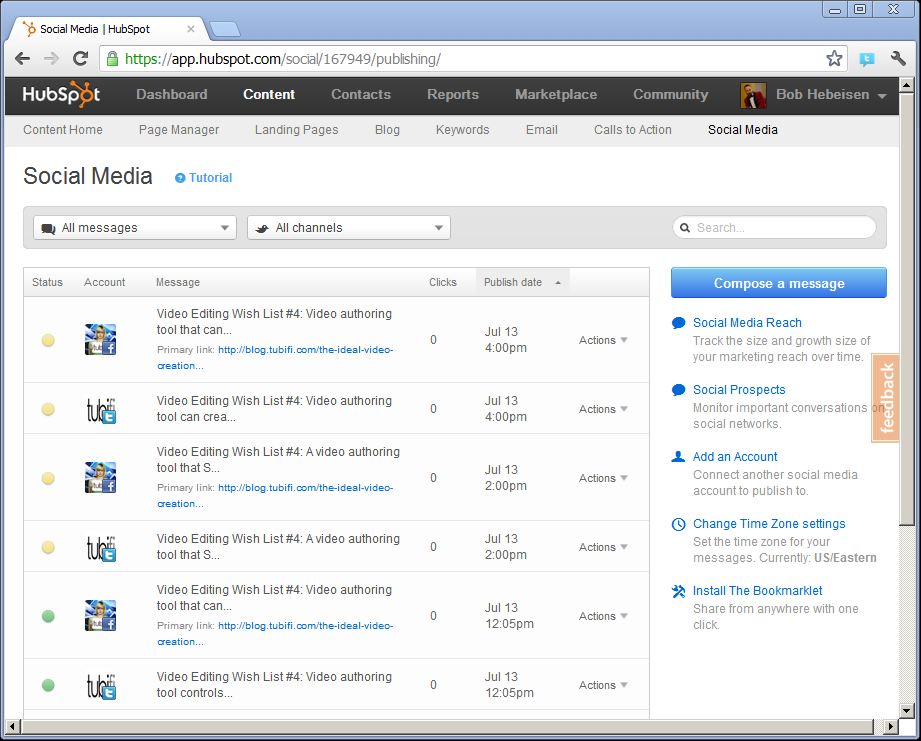
HubSpot Social Media Publishing Dashboard

The HubSpot Social Media Publishing tool shows you which messages have been scheduled (yellow light), which have been published (green light), and which have encountered errors (red light).  It also tracks the number of click-throughs associated with the URL.

Limitations:

  • HubSpot tracks clicks only.  No measurement of retweets or shares or likes.  No measurement of new followers/likers.

 HootSuite?

I’m interested to hear from anyone who is using the new HootSuite/HubSpot integration to understand if there is feature overlap, and if so which one does it better (please comment below).  Here are a couple of links about it:

It looks to me like it is more focused on contact management and conversation monitoring, and less on the publishing side of things.  Not sure if there are limitations (i.e., maybe you need the Professional version of either Hootsuite or HubSpot or both to capitalize on all the features of the integration).  Maybe it has a better interface for composing and scheduling your messages?  Maybe it has better tracking beyond just clicks?  Anyone with experience please comment below.

Posted in A/B Testing, Facebook, Google Plus, Hubspot, LinkedIn, Marketing Automation, Social Media, Twitter | 3 Comments

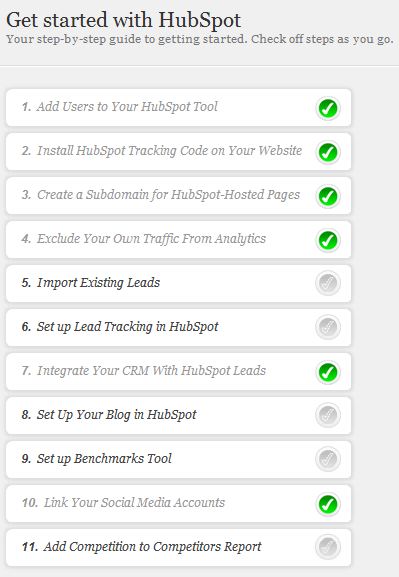
HubSpot Implementation Progress Update: Week 1

By Bob Hebeisen

It has been a busy but productive first week getting HubSpot up and running at Tubifi.  Here’s the day-by-day log:

Thursday 4/19:

  • First day with HubSpot!
  • Added the HubSpot tracking code to our website footer, landing pages, and blog. Simple copy and paste. Since then daily reports of our website traffic have been emailed to me and my colleagues. Reports include company names, how many users from that company visited, what pages they viewed, the referring web page, and what campaign they are tied to if it was a campaign that drove them there. It is not really a lead report because there is no contact info for anyone who is not already a HubSpot lead. But it is pretty interesting and potentially valuable for sales prospecting to see what companies are visiting your website.

Friday 4/20:

  • Created new HubSpot user accounts for other users at my company (i.e., sales reps, CEO, etc.)
  • Set up SalesForce.com integration. This was pretty easy, thanks to exceptionally good “how to” documentation in the HubSpot Help & Support Center. Even so I had my first call with Tech Support, which was strikingly pleasant.

Monday 4/23:

  • First call with my consultant, Leslie. Like everyone I have dealt with at HubSpot so far, Leslie is smart, super friendly, high energy, likes to laugh… they clearly recruit for this personality and it is a great reflection of their brand. Everyone you talk with at HubSpot is committed to making marketing and getting stuff done fun. Leslie reviewed the agenda for our once per week consultation calls for the next 6 weeks.
  • With the help of IT I set up a subdomain (web.tubifi.com). The subdomain is where you post all your HubSpot pages (landing pages and blog articles). These pages sit on a HubSpot server. By virtue of sitting on the HubSpot server, you take advantage of all the HubSpot features: tracking, lead handling, social media & email integration, etc. But thanks to the subdomain you would need to look very hard at the URL to know that. And HubSpot automatically duplicates your website’s header and type template, so the pages fit in seamlessly with the rest of your website.
  • Set up our social media accounts in HubSpot. Two major benefits:
    1. You can publish updates to your social media accounts directly from the HubSpot console. Still trying to figure out if you can publish directly to your LinkedIn *company* page status update, and if you can publish an update to Google+.
    2. HubSpot uses your social media account info to create a “connect with Tubifi” module. The “connect with Tubifi” module appears on all landing pages and emails. Still trying to figure out if HubSpot can use this info to create a “share this” module.
  • Designed my first HubSpot email. I was frustrated at the limitations on the layout for HubSpot emails… I may become a beta tester for their new email program to be launched broadly in June.

Tuesday 4/24:

  • Set up my first landing page: “Free On-Demand Webinar: How to Create Affordable Video Marketing and Drive Revenue.”  Essentially I created a gateway that makes people fill out a lead capture form before they can access a recorded webinar that I had already posted. The landing page was really easy to create and customize with HubSpot. I even built a custom confirmation email that is sent to anyone who completes the form.

Wednesday 4/25:

  • Promoted my first landing page and saw form submissions start to roll in.
  1. Social Media: posted the campaign to Facebook, Twitter, and LinkedIn.
  2. Email Marketing: swapped this offer into a 3rd party email program we have been participating in.

Thursday 4/26:

  • Fixed the SalesForce integration with the help of HubSpot Tech Support. The responses from the landing page I set up the previous day were making it into SalesForce.com, but they were stuck in a strange category and weren’t automatically converting to leads or contacts. The HubSpot Tech Support rep helped me understand that the form submissions were blocked from becoming leads because there of a lead qualification rule set up in SalesForce.com. SalesForce.com was requiring that a Lead Source be entered for each of the form submissions before it would accept them as leads. So the Support rep helped me assign the lead source of “HubSpot” to each lead. Then he helped me add a hidden field to my landing page that automatically assigned “HubSpot” to the lead source of any form submission. All set, now all form submissions are automatically becoming leads in SalesForce.com
Next Steps:
  • Import existing leads
  • Set up drip marketing campaigns to nurture leads
Posted in Drip Marketing, Email Marketing, Hubspot, Landing Page Optimization, Lead Generation, Marketing Automation, Social Media | Leave a comment

Just unwrapped my newest present: Hubspot!

By Bob Hebeisen

I’m pleased to report that Tubifi just subscribed to Hubspot!

I have been following Hubspot’s blog and twitter feeds for quite some time. They really do an impressive job of not just talking the talk, but walking the walk. Just tons of great, practical tips about “inbound marketing,” SEO, email marketing, content marketing, and lead nurturing. And they are putting these best practices to work in their own marketing.

I’ve seen several sales presentations and demos, and it all looks pretty intuitive and easy to use. I gotta say, our sales rep was really good. The first presentation I saw was conducted by a technical rep, it was a deep dive on some advanced drip marketing functionality. But other than that, the sales rep just conducted the demos herself by sharing her desktop and showing how she and her colleagues at Hubspot use the tools themselves. I think the ability of a non-tech to give a compelling live demo is really powerful for a tool like this.

Here’s why I am looking forward to digging into Hubspot:

  • It will give us a platform for drip marketing
  • It will tie our website and email marketing to salesforce.com
  • It will improve our SEO
  • It will allow us to publish website and blog content to social media
  • It will roll it all up in a dashboard with analytics to help us measure marketing success/failure
  • Overall, it will make me much more productive

One of my colleagues suggested we could perhaps get free or low cost solutions to accomplish the same goals. That may be true, but stitching together a bunch of free/cheap tools to do the job sounds too much like a science project and a recipe for inefficiency. For example, it took me about 4 hours the other day to try to run a batch conversion of leads to opportunities in Salesforce.com using a free spreadsheet utility… Ultimately I failed and, guess what, the same colleague who suggested using free software had to bail me out and do it himself. Our biggest challenge is capacity. Hubspot costs roughly $1K per month, a reasonable investment if it can increase my productivity significantly and function as reliable plumbing to connect our sales and marketing activities.

First two steps were pretty simple:

  1. Insert the tracking JavaScript into our web page footer and blog so Hubspot can track all traffic on the site
  2. Set up a subdomain where blog articles and landing pages can be posted

I’ll blog about the rest of the setup process…

Posted in Drip Marketing, Email Marketing, Hubspot, Marketing Automation, Search Engine Marketing, Social Media | 2 Comments

BostonMarketers Digest 2012-03-14

BostonMarketersBy Bob Hebeisen

Some of the smartest marketers on the planet hail from right here in New England.

Top stories below from Dave Charest of Constant Contact, LinkedIn, Tubifi, Overdrive Interactive, and NEDMA.

Subscribe to the BostonMarketers Twitter list.

  • How Do You Measure Trade Show Success?
    Group discussion in the LinkedIn B2B Technology Marketing Community
    I wrote a pretty comprehensive story about tradeshow marketing for MarketingProfs back in June 2011, but this discussion thread in the LinkedIn B2B Technology Marketing Community is helpful if you are trying to re-focus your thinking around trade shows and what constitutes success.  My best tip is that the exhibit space is only the tip of the iceberg: you should be thinking about things that happen outside of the exhibit space, such as speaking opportunities, PR, demo suites, and your follow-up after the event is complete.
  • How to Create World-Class Video Advertising and Drive New Revenue
    Tubifi recorded webinar
    Tubifi’s recorded webinar provides a comprehensive look at the state of video production today.  Content marketers want it all: (1) high-impact videos that (2) can be created quickly and (3) won’t bust your marketing budget.  Is it possible to have all three?  Tubifi says yes and explains how.
  • Taking Advantage of Your Facebook Timeline for Brands
    Overdrive Interactive recorded webinar
    Did you know that on March 30th Facebook will switch your brand page to the new Timeline layout whether you like it or not?  This short recorded webinar from Overdrive Interactive gives you all the info you need to maximize the new layout, including pixel dimensions for all the graphics, how to pin important stories to the top of the layout, and how to make prominent your most important apps/tabs.
  • Attend NEDMA’s Marketing Technology Summit
    March 21 at the Boston Common Hotel & Conference Center
    Boston Marketers need to leverage the application of marketing technologies and tactics to accelerate ROI. So join the New England Direct Marketing Association (NEDMA) for a day of cutting edge marketing technology education.  Learn more and register here.

Are you a Boston Marketer with a good story to share?  Tell me about it in the comments below.

Posted in BostonMarketers, Facebook, Trade Show Marketing, Viral Video | Leave a comment

BostonMarketers Digest 2012-02-28


BostonMarketersBy Bob Hebeisen

Some of the smartest marketers on the planet hail from right here in New England.

Top stories below from Melissa Miller from HubspotJaime Reynolds from MITX, Ann Handley from MarketingProfs, and Bob Hebeisen.

Subscribe to the BostonMarketers Twitter list.


  • 20 Fresh Stats About the State of Inbound Marketing in 2012
    Hubspot blog, Melissa Miller
    Spoiler alert: Hubspot’s research shows leads generated from “inbound marketing” are better.  But all kidding aside, if you are trying to justify your investment in blogging, social media, and SEO, then these are some great stats to show to the higher-ups that need to be converted.  Follow the link for a Slideshare you can download for using the charts in your own presentation, and you can register for a webinar presentation of the data on Thursday March 1.
  • The Keys to Community Engagement: A MITX Event Recap
    MITX blog, Jaime Reynolds
    Boston Marketers ought to be engaged with their peers in a local organization, and Massachusetts Innovation and Technology eXchange is a great place to start.  Jaime Reynolds recaps their recent meeting with video interviews from some of the guest speakers. Barbara Messing (CMO for TripAdvisor) discusses how you must understand your audience in order to fine-tune your customers’ social media engagement.  Nick Ayers (Manager of Social Marketing for Intercontinental Hotels) notes that tapping into brand ambassadors is a solid strategy for building meaningful content. Looks like it was a great meeting!
Posted in Blog, BostonMarketers, Community Site, Search Engine Marketing, Social Media, Viral Video | 2 Comments

Checking in on the results of my Viral Video experiment

By Bob Hebeisen

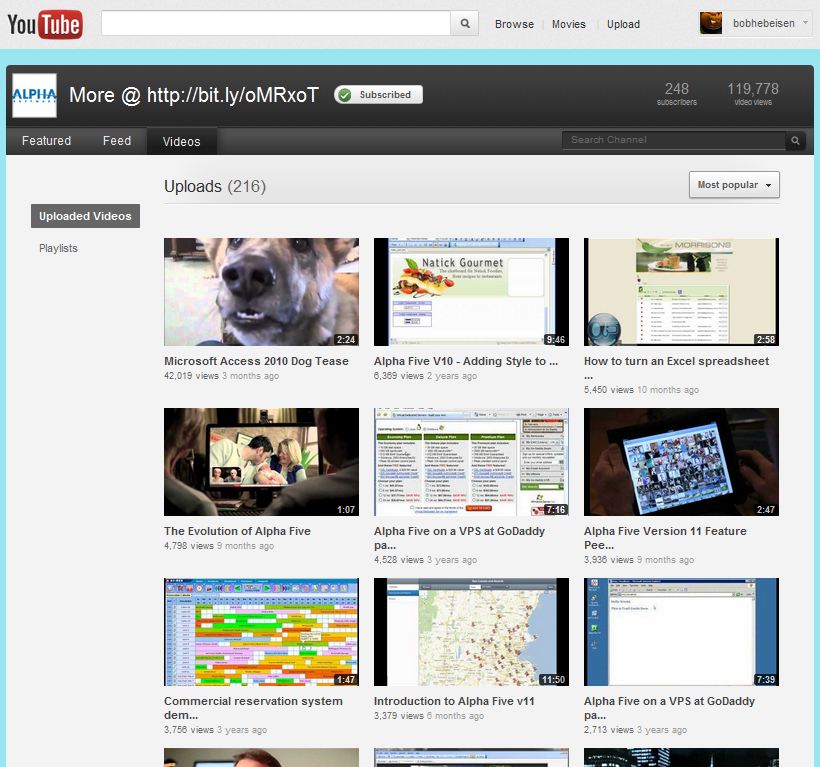
Back in October I wrote a post about a viral video I had created for Alpha Software, one of my contracting clients.  On the eve of The Superbowl (the ultimate launching pad for commercial video), I thought I would check back on the results.

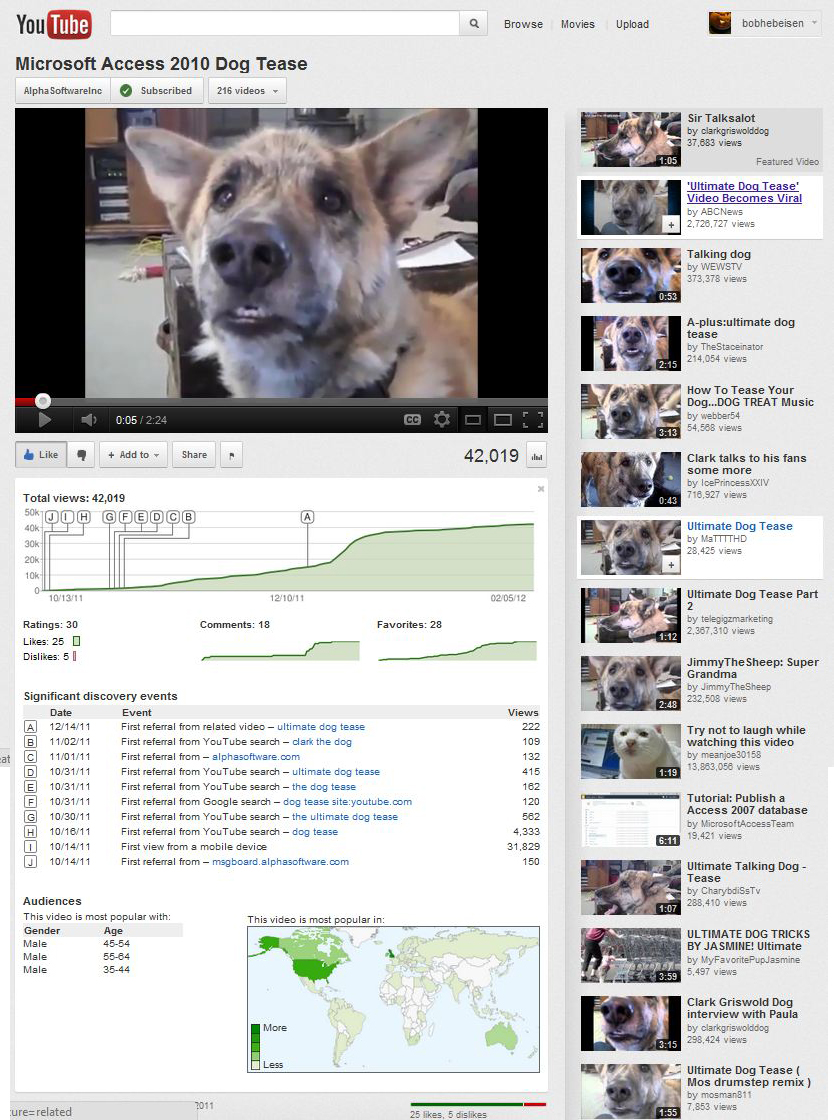
I was quite pleased to see that the Microsoft Access 2010 Dog Tease  has actually gained some measure of viral success:

  • Over 42,000 views
    The original Dog Tease video which inspired it now has 92 million views, so 42k views may not sound like much by comparison.  But Alpha’s market is niche, so it is not realistic that their video would garner huge numbers like that.  Alpha is actually quite prolific at posting videos on their YouTube channel.  But the 42k views for the Dog Tease video is almost 7x more than the next most popular video on Alpha’s YouTube channel.  The video with the next most views is one that was posted 2 years ago, while the Dog Tease video was posted only 3 months ago.


  • Classic “hockey stick” growth chart
    You can see from the YouTube metrics charts that the viewership exploded during the month of December.  This is where the meme strategy really paid off because a massive amount of viral referrals came from other talking animal videos.


  • Shows up well for Microsoft Access searches
    The whole purpose of the video was to point out Alpha Five’s superiority over Microsoft Access for creating Web applications.  So I carefully chose the meta tags and keywords for the video, and that’s why I entitled the video “Microsoft Access 2010 Dog Tease” (instead of “Alpha Five Dog Tease”).  As a result, for example, when you search YouTube for “Microsoft Access 2010 Web database” the dog tease video shows up as the second organic video in the search results.  It’s actually kind of hilarious to see the thumbnail image of the dog in the search results.


Posted in Internet Meme, Meme, Video Marketing, Viral Video | 1 Comment

Portfolio – My Letter is Included in the book “World’s Greatest Direct Mail Sales Letters”

By Bob Hebeisen

In honor of “Green Monday” (the highest volume shipping day of the year fueled by direct response Christmas purchases), I thought I would post this direct mail campaign accolade from the old days.

This letter really got the warehouse cranking, shipping copies of Alpha Four database application all across the globe!

Some notes about this campaign:

  • Karl Freitag was the head writer on this project, he was very generous to give me a co-author credit.  I gave him the basic concept (I need your help/David vs. Goliath theme) and then he worked his magic.  I also did the technical editing to make sure he was describing technical aspects of the product accurately.  Karl was a fantastic direct response writer who cut his teeth on the seminal DAK consumer electronics catalogs of the ’80s and ’90s.
  • Some people think direct mail is dead.  I don’t think it is dead, but I agree that other methods of marketing have gained higher priority in the B2B marketing arsenal.  But I am thankful every day for my direct mail roots because it really galvanized my discipline for setting up testing, tracking costs, analyzing results, and making sure your marketing plan is optimized for driving ROI.
  • Lewis and Nelson comment that the headline (“My Name is Richard Rabins and I Need Your Help”) “at once enlists the reader in the writer’s psychological army… what an impressive rapport-builder.”  This was a pretty innovative concept, and really differentiates the effort from the standard software sales letter which talks about speeds and feeds.  It also gives a plausible explanation for the low price of the software.
  • It is a long letter — 4 pages.  We tested it against a 2 page letter and the longer letter won.
  • Years later I walked into a job interview with a guy named Danny Kastner, who was running a cool little Flash/email marketing boutique agency called POPstick.  When Kastner asked me about my professional background, I started explaining that my first job out of college was doing direct mail marketing for a small company called Alpha Software Corporation.  He got a far-away look in his eyes and said “I remember those guys… ‘my name is… blah blah blah… and I need your help…'”  I couldn’t believe it, but he was reciting back to me the headline of this letter!  He actually remembered reading it, even though it was probably 7 or 8 years later.  I pulled a copy of the letter out of my briefcase and presented it to him, I had planned to use it as the writing sample they asked for.  I was pretty much hired on the spot.
  • This book, World’s Greatest Direct Mail Sales Letters (© NTC Business Books, 1996), is still available for purchase and it has tons of great copywriting that is inspirational even to this day.
Posted in Copywriting, Direct Mail, Portfolio - Awards | Leave a comment