Facebook Doesn’t Work For B2B, But Here Are 4 Social Media Marketing Techniques That Do

There is a lot of discussion about how Social Media Marketing might fit into Channel Marketing (and into B-to-B Marketing in general). I recently wrote an article about how I thought Social Media had zero significant advantages as a tool for Vendors to communicate with Channel Partners. However, I do not think it is fair to throw out the baby with the bathwater.

Here is a run-down of 5 social media tactics that VARs might already be juggling, or might be considering including in their marketing plans. One is a loser, but 4 of them have real potential and can positively impact your marketing activities.

Facebook: A Social Media Marketing Technique That Does Not Work For VARs

What it’s good for:
Distracting you from marketing work that will produce real results; giving Social Media a bad name in the B-to-B marketing world; causing your colleagues and managers to doubt the value of marketing.

After 3 years of hard work at PTC we secured just over 3000 “fans” of PTC’s Pro/ENGINEER – Did You Know Facebook page [EDITOR’S NOTE: it is now October 2011 and I see this link is now broken; evidently PTC took my advice (below) and abandoned this fan page]. That’s not bad, and I want to acknowledge the terrific work that went into building out the strategy, content and audience. For the first year it was very difficult to get fans to post or comment or upload. But the page manager soldiered on, posting great content. Over the years she has refined her content strategy and writing style (writing for Social Media is a tricky art), and the community matured, and now there is a decent amount of interaction from the fans.


But I would estimate that 1/4th to 1/3rd of those 3000 fans are PTC employees or channel partners. Also, consider that in about the same amount of time my local watering hole, Trina’s Starlight Lounge, has secured 2200 fans. PTC is a global brand with millions of users, while Trina’s is a neighborhood bar serving PBR and a daily hotdog special. This illustrates just how difficult it is to build a B-to-B presence on Facebook. And I dare say that Trina’s can probably claim more sales revenue as a result of their Facebook campaign (I have gone in for their “dog of the day” special at least twice after seeing it on Facebook, and that alone is probably enough to tip the scale).

Several PTC VARs have created Facebook pages. For example, 3 HTI, a PTC Platinum VAR, posts status updates and content once per week or so. They leverage a lot of PTC content on PTC’s YouTube channel, website, and blogs. But after 2 years they have only 100 fans. Most of them are employees of 3 HTI or PTC, and there is very little interaction with the content 3 HTI is posting on Facebook.

People use Facebook for fun. It has been used successfully by some consumer brands. But it is just not gaining widespread traction in the B-to-B world, despite a ton of hard work and a ton of hype. By any conventional standard of measurement (brand impressions, leads, sales, etc.), marketing on Facebook — for both Vendors and VARs — is a failure. There are easier and cheaper ways to conduct marketing to larger audiences with better results.

Dos and Don’ts:

  • DO turn your Facebook page over to your HR department. Maybe it has some value as an employee morale building or recruiting tool. But you should detach it from your Marketing work because people love to take pot-shots at Marketing and your Facebook page represents a very public target if they are trying to build a case that you are not pulling your weight.
  • DON’T spend more than 5 minutes per week on it. In a world where the biggest problem for VAR marketing is lack of capacity, Facebook is something you should hack off your marketing to-do list.

4 Social Media Marketing Techniques That Do Work for VARs:

#1. Community Site

What it’s good for: Building the vendor brand; building your VAR brand; building your personal brand; identifying industry trends & topics; promoting lead generation offers; identifying sales opportunities.

The best Social Media Marketing strategy a vendor can undertake to the benefit of a Channel Program is building a social media customer community. Vendors should create a social media community for customers to network, share successes, solve problems, and learn about relevant product and industry topics. VARs should be a part of this community. They should comment, solve problems, post interesting questions, and show off their customer success stories. All the while, VARs will be building their brand as subject matter experts. It’s essential that VARs keep the selling to a minimum, but sales opportunities will surface as you build your brand and participate as a good community member.

You can build a community with LinkedIn groups, discussion boards, or community building platforms like Jive.

In June 2010, PTC launched a customer community called “PlanetPTC” (http://communities.ptc.com). It was created using Jive and it offers users the ability to create an account and access features including discussion forums, blogs, wikis, news feeds, file sharing, groups, content rating, commenting, tagging and friending. Forrester Research categorizes PlanetPTC as an “energizing” community and it was a finalist in Forrester’s 2010 Groundswell Awards. (Full disclosure: Forrester performed a paid consulting assignment to help PTC plan and implement the community.)

To date, there has been no programmatic outreach from PTC to get the VARs to join PlanetPTC. PTC wanted to launch the community to customers first to prevent it from being overrun by VARs at the outset. Smart move. You don’t get a second chance to make a first impression and it was important to nurture customer engagement to start with. The time is right now (or perhaps it is past due) for PTC to push the VARs to join and participate in the community.

Dos and Don’ts:

  • DO rely on the *Vendor* to create this community. Building and maintaining a customer community is a lot of work and it is best left to the Vendor, not the VAR. One year before PlanetPTC was launched, one of our biggest VARs attempted to launch their own community website. “TriStar Commons,” launched in 2009, was an ambitious venture that ultimately failed because TriStar could not manage the demands of maintaining an editorial calendar and they could not compel customers to join or participate. The Vendor will have more resources and better ability to execute successfully than the VAR.
  • DON’T be too promotional. Yes, VARs can use the site to promote offers and pursue sales opportunities. But it should be balanced with altruistic participation. Once your reputation as a member in good standing and your subject-matter expertise is established you will see sales opportunities emerge.

#2. LinkedIn Groups

What it’s good for: Building your VAR brand; building your personal brand; identifying industry trends & topics; promoting lead generation offers; identifying sales opportunities.

I mentioned above that you could create a community site using LinkedIn groups. It would be a pretty stripped-down community site, really just a discussion forum, because LinkedIn does not enable users to upload/download items. So you would need to post any rich content (videos, PDFs, etc.) on other platforms like YouTube or your corporate website or Google Docs or Scribd or your blog. PTC did this for the Creo Elements/Pro Users group on LinkedIn. The Creo Elements/Pro Users group is managed by a PTC marketing staffer, it has around 2000 members, rich content is hosted elsewhere as described above, and there are interesting conversations going on about using CAD software. Again, this is a user community effort and it is best for the Vendor to take ownership of establishing the group, not the VAR (though the VARs can and should be active group members).

A great way for the VARs to use LinkedIn is to join LinkedIn groups where your customers and prospects are congregating. For PTC VARs, joining the Creo Elements/Pro Users group mentioned above is a no-brainer, and many have done that. There are other groups not managed by PTC that should be on their radar, too:

It is really easy to find groups like this using the LinkedIn search engine. The VARs should definitely join the ones hosted by their vendor. But it is equally (or more) valuable to join the ones that are not officially owned by the vendor because that is where you will see users of competitive products voicing their frustrations.

Dos and Don’ts:

  • DO sign up for weekly digest emails. This is a setting you choose when you sign up for a group. That way you don’t have to hang out in the group all day waiting for something interesting to happen. Also, keep the weekly digest emails in a folder and you will create an archive of group activity so you can use your email’s search functionality to research any group member you are interested in.
  • DO start slow with a “listening” exercise. Do not post any comments for the first week or so until you can get a flavor for the tone of the group.
  • DO participate in conversations that don’t directly involve a sales opportunity. Establish a track record of being a good group member and a general subject matter expert.
  • DON’T be overly promotional. If you go in there like a shark you might be flagged as inappropriate by a member or kicked out by the group owner. Consider carefully the option of “replying privately” (via a one-on-one LinkedIn email with the group member) instead of posting a comment for all to see.
  • DON’T disguise your identity. Don’t pretend you are not a VAR. If you try to hide your identity, sooner or later you will be found out and your credibility will be destroyed.

#3. VAR Blog

What it’s good for: Building your VAR brand; promoting lead generation offers; improving Search Engine Optimization for your website.

Creating a VAR blog is an incredibly powerful marketing activity because it really gives you the ability to showcase the “Value Added” part of being a Reseller. A great example is the PLM blog that Stephen Porter writes for Zero Wait-State (VAR/agent for PTC and Oracle). Stephen is a very clever writer with a great voice for Social Media and a ton of industry experience.

Dos and Don’ts:

  • DO create an editorial calendar. You need to maintain a steady cadence of posts or your audience will lose interest. At least 1 post every-other week is a good place to start. Create a list of 12 topics on a white board. That’s a 6-month editorial calendar. As you get into the swing of it, ideas will start popping into your head all the time and you can just add them to the list.
  • DO attach your blog to your website. This can be a massive boon to Search Engine Optimization. Hubspot is a great tool to consider if you are going to create a VAR blog, their tool set makes it easy for small businesses to publish blog content that is anchored in your keyword strategy and measurably improves SEO.
  • DO promote traffic to the blog. Make sure your blog is prominently featured in your website navigation. Promote blog posts using e-newsletter, email, Twitter, discussion groups, your company’s email signature, etc.
  • DO reuse content that was created for other purposes. Content creation is a burden. So when you create content for other purposes, blog about it. For example, blog about the case study you just published, about the YouTube video you just posted, about the analyst report your Vendor just commissioned, about the trade show at which you just exhibited, etc.
  • DO respond to any comment quickly. Even if it is just to say “thanks for your comment” or “let me check on that and I will get back to you.” Comments represent audience engagement, and that is very hard to come by, so treat them like they are delicate flowers that need to be nurtured.
  • DON’T get bogged down. Your posts don’t all have to be long. You can post short ones that talk about an interesting point made in a white paper or analyst report or video or news item. Or just ask a provocative question and see if you can get an interesting conversation going with your followers. It is good to have variety.
  • DON’T go it alone. Share the burden of content creation with one or two other people in your organization. Make sure at least one of them is a technical expert and can field any technical questions and comments that are posted.

#4. Twitter

What it’s good for: Establishing relationships with industry influencers; building your VAR brand; building your personal brand; identifying industry trends & topics; promoting lead generation offers.

Twitter is one of the hardest to understand forms of Social Media for newbies. But it is also probably the easiest one to get started with if you just stick your nose in there and do it. I suggest that you create a corporate Twitter account, plus a Twitter account for any individual at your company who is also blogging.

The great thing about Twitter is it does not require a lot of unique content creation. Look at how EAC Product Development Solutions builds a steady stream of interesting tweets simply by retweeting content from other sources (tweets from their vendor, news and articles from relevant editors, publications, and bloggers). And they also use Twitter as another medium to promote offers such as their webinars, seminars, and meetings of the local User Groups they support.

Single-Sourcing Solutions, a VAR who sells PTC’s ArborText product, has a similar Twitter presence. And CEO Liz Fraley has also done a great job of building her own personal brand by blogging and tweeting (as well as tireless offline networking in the XML industry).

Dos and Don’ts:

  • DO start by following the editors of the magazines and bloggers that cover your industry. These are important inflencers you want to build relationships with. And they are being followed by your target audience.
  • DO start slow with a “listening” exercise. Twitter is difficult to understand at first, so give yourself some time to figure it out before you start tweeting.
  • DO retweet posts from the people you are following. It ingratiates you to them and helps you build relationships. Retweets are the currency of Twitter; if you retweet their stuff then they are more likely to listen to you and perhaps retweet your stuff.
  • DO set goals about your frequency of tweets. Try something like “I want to retweet something interesting 2 times per week, and I want to tweet about something original once per week.” Dial it up or down based on your comfort level and results.
  • DO rebroadcast your Twitter feed. You can register your Twitter handle on your LinkedIn profile so your Twitter posts will be rebroadcast as LinkedIn status updates. You can use plug-ins and apps so your Twitter feed will be shown in a widget on your blog and your website. These steps will give your tweets more exposure even to people who do not use Twitter.
  • DON’T follow too many people all at once. The volume of tweets will be unmanageable.
  • DON’T tweet about personal stuff. Leave that for Facebook, or a separate personal Twitter account. As Heather Margolis says in her excellent Channel Maven blog: “Twitter is not just a place for people to talk about what they had for breakfast or when they are going to the grocery store. If that’s what you tweet about I can assure you, I’m not following you.” If more than 5% of your Tweets are personal then something is wrong.

So in conclusion…

Yes, there is a lot of hype surrounding Social Media Marketing in the B-to-B Channel. But I think these 4 tactics are worth the time of VAR Marketers and can produce real benefits.

What do you think? Do you have experience (positive or negative) with any of these tactics? Please tell me about it in the comments section below.

Posted in Blog, Community Site, Facebook, LinkedIn, Social Media, Twitter, VAR Marketing Techniques | 7 Comments

Can You Use Social Media to Communicate With Your Channel Partners?

I recently posted an answer to a question on LinkedIn regarding using Social Media with Channel Partners:

Question: “What is the most cost effective and sustainable way to engage with channel partners on a social media platform?

My Answer: “…You can encourage open discussions among your channel partners about your channel program by creating a LinkedIn Group for your Channel program. For the “Access” setting you should select “Request To Join” so you can be the gate keeper for membership, and then click “Create a Members-Only Group.” Put together an editorial calendar of topics you want to discuss. Come up with a reward system to encourage engagement (could be financial incentives like MDF, or simply award logoed gear each week to the ones who are top influencers and key contributors)…”

The Problem Is, It Won’t Really Work.
Well, to be more precise, you *can* create a LinkedIn Group as described above… And you *can* incentive-ize VAR engagement in the Group… But you will *probably not be successful* in getting your Channel Partners to openly discuss topics and share best practices using this Group, or any other social media mechanism.

The reason is because most Channel programs pit resellers against one another by giving them overlapping sales territories. At PTC we often had 3 or 4 different VARs covering the same geography and the same market. They would compete brutally for the same prospects and customers, sometimes competing in a price war that compelled one VAR to finally win the sale at a negative margin. They would also steal each other’s sales reps and AEs. They would trash-talk and get in fist-fights at the annual sales kickoff meetings (true story).

It is very difficult to eliminate this sort of VAR vs. VAR competition. We minimized it to some extent by using a deal registration system and account protection rules. But it is nearly impossible to eliminate it entirely. And in fact it is not really desirable to eliminate VAR vs. VAR competition completely because the right amount of competition keeps them working hard to cover the territory and satisfy your customers.

Social Media is a great tool for bringing together a community of like-minded people so they can spontaneously engage with one another (post questions and answers, etc.) for their mutual benefit. It is not a good medium for organizations who are in direct competition with one another, because it would be foolish for any community-member to share knowledge that would help their competitor to become stronger.

A Better Solution:
Better solutions for communicating effectively with your channel are tried and true:

1. Weekly Channel Ecosystem Webcast
Share important program and product information. Enable Q&A. Post the recordings in a searchable archive on the Partner Portal. Make it mandatory to attend each week, but optional to participate in the Q&A.

2. Partner Portal
Post product information, recorded webcasts, marketing campaigns, etc. for review or download in a password-protected intranet for the VARs.

3. Annual VAR Advisory Council Meeting
Invite your most influential VARs from each geography to a 2- or 3-day summit to discuss their interaction with all departments and business functions within your Channel organization. VAR principals can typically put aside their differences for this once-per-year meeting and identify what about your Channel Program is working and what needs to be improved in each major geography.

Social Media is great, but it is not the answer for everything.

Do you have a different opinion or experience? Please share it with me in the comments section below!

Posted in Partner Portal, Social Media, VAR Advisory Council, VAR Webcast | 1 Comment

PTC (once again) Awarded CRN’s 5-Star Ranking for Channel Program Excellence


I just noticed that PTC was once again awarded 5 stars (the highest ranking) in CRN’s 2011 Partner Program Guide.

I am proud of the innovative global channel marketing programs I deployed that helped PTC earn CRN’s 5-Star award for partner program excellence:

  • Marketing Development Funds (MDF)
  • Marketing training
  • Joint marketing planning
  • Marketing outsourcing
  • Marketing campaign templates
  • Lead passing
  • PR assistance
  • Case study development
  • Website marketing syndication
  • Email marketing syndication
  • Partner Portal

Click here to see PTC’s “5-Star” credentials in the 2011 CRN Partner Program Guide.

PTC previously earned a 5-Star rating in 2004, 2007, and 2010.

Posted in Channel Marketing Best Practices, CRN, Portfolio, Portfolio - Awards | Tagged | Leave a comment

Free Seminar Planning Calendar, Timeline, & Checklist

Just finished conducting a webcast for the VARs about how to plan and execute a seminar and I figured I would post a “sanitized” version of the presentation and planning resources here:

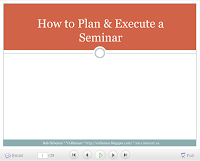
1. Slideshare: “How to Plan & Execute a Seminar”
Link: http://www.slideshare.net/bobhebeisen/how-to-plan-execute-a-seminar
Agenda:

  • Set Your Objectives & Strategies
  • Planning The Date, Location, Topic & Time
  • Marketing & Sales Coordination
  • Marketing Execution: Registration Form & Invitation
  • Seminar Presentation
  • Day of the Event Logistics
  • After the Event Follow-Through
  • Resources

2. Planning template: Seminar Planning Calendar + Timeline + Checklist
Link: https://docs.google.com/leaf?id=0BwdynuOi-Ji-NTliMjgxMzAtNjQxYy00MjVkLWIyNjEtN2IzOTkxNzdkY2Iy&sort=name&layout=list&num=50
Tab 1: Calendar & Timeline
Tab 2: Day of Event Checklist

3. Writing Compelling Invitations for Seminars
Link: https://b2bhebeisen.com/2010/03/05/writing-compelling-invitations-for-seminars-webinars/

4. Avoiding Common Pitfalls for Seminars
Link (Part 1): https://b2bhebeisen.com/2010/01/29/avoid-common-pitfalls-for-more-effective-sales-seminars/ 
Link (Part 2): https://b2bhebeisen.com/2010/03/05/avoid-common-pitfalls-for-more-effective-sales-seminars-part-2/

Posted in Channel Marketing Best Practices, Email Marketing, Field Marketing, Seminar Marketing, VAR Marketing Techniques, Webinar Marketing | Leave a comment

How do you fix bad VAR Websites? (Part 3)


In post 1 and post 2 on this subject matter I noted that we see a couple of common problems with our VAR websites:

  1. VAR websites exhibit low, slow adoption of our marketing assets
  2. VAR websites frequently exhibit product branding violations

I noted that before now the only way we had to fix the situation was to nag each individual VAR to add new marketing programs, discontinue outdated marketing programs, and fix branding violations. It was like a game of “whac-a-mole” because as soon as you fixed one problem you were on to attack a long list of others.

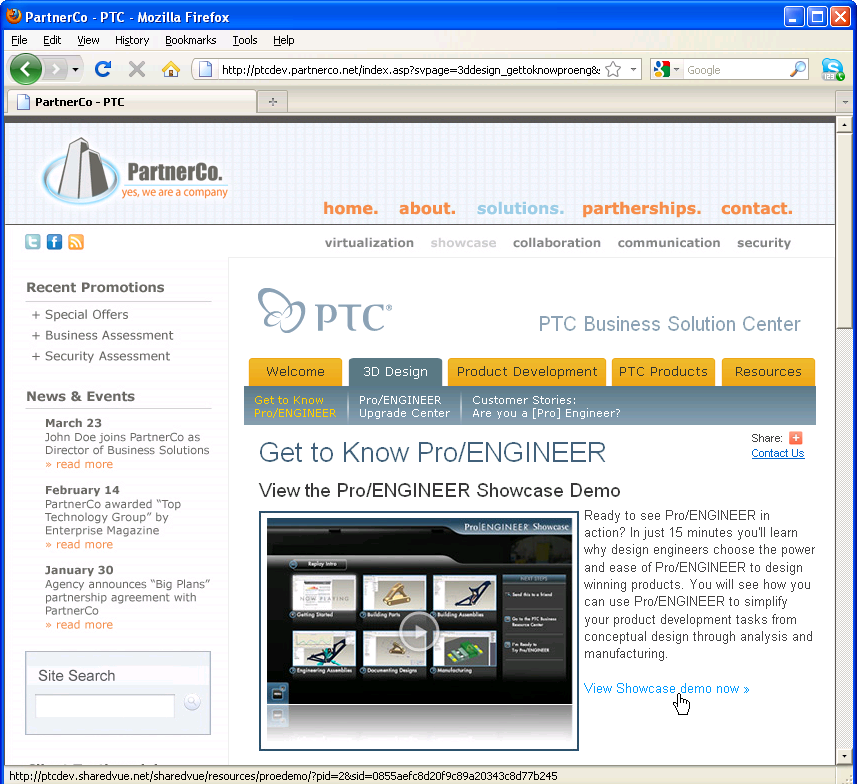
So we were trying a new service called SharedVue Website Content Syndication…

Problem: Solved!
How do you fix a bad VAR website? My little joke was that you don’t fix *a* VAR’s website; instead you fix *all* of them. Well, I am pleased to report that we have launched the service and gone “live” with our first four VARs. (Not nearly all of them, but a good start, and I expect adoption to be brisk.) Take a look:

  1. Customer Driven Technology: http://www.cdtplm.com – click the banner on the left that says “PTC Business Solution Center”
  2. Impac Systems: http://www.impacsystems.com – click the text link at top right that says “PTC Business Solution Center”
  3. Global Product Delivery Systems: http://www.g-pds.com – click the text link in the middle of the screen that says “PTC Business Solution Center”
  4. Maintenance Reseller Corporation: http://www.mrcpds.com – click the text link in the middle of the screen that says “PTC Business Solution Center”

This “PTC Business Solution Center” that is common to each site is the product of the SharedVue Website Content Syndication. It delivers:

  • Quality marketing content – we can now easily drop into any VAR website our best ~25 marketing campaigns
  • Easy to deploy – the VAR pastes one line of HTML code onto one page of their website to accept the syndication feed, it takes less than 30 minutes to set up
  • Hands-off maintenance – takes away the burden of website maintenance for the VAR because campaigns & product collateral are refreshed centrally by my team and changes are automatically and instantly syndicated to the VAR websites
  • Lead flow – certain campaigns have lead capture forms, and the leads go directly to the VARs

Pretty cool, eh? What do you think?

Posted in Channel Marketing Best Practices, SharedVue, VAR Marketing Techniques, Web Content Syndication, Website Marketing | 4 Comments

Writing Compelling Invitations for Seminars (& Webinars)

Here is an often cited direct marketing maxim:

Sell the offer, not the product.

This is an important distinction, especially in seminar marketing. The objective with your seminar invitation is NOT to close the sale (so in the invitation don’t go on and on endlessly about your product). The objective of your invitation is much more short-sighted than that — it is to get the recipient to register for (and then hopefully to attend) the seminar. Once you get your prospect seated in the room, then you can begin a more in-depth dialog to understand their needs, fully explain your product solution, and to ultimately close the sale.

Sell the offer, not the product — so what does that mean? The offer, in this case, is the seminar event itself. Your seminar invitation needs to compel the recipient to register and attend. Your seminar invitation needs to…

  1. Convey the value of attending — What will they learn? What credible sources will they learn it from? Is it being held at a cool place?
  2. Remove reasons for hesitation — When and where is it? How do I get there? Is there parking? Will I have to skip a meal? Is it really for me?

A Template You Can Follow:

Seminar marketing is actually quite formulaic — it’s tried and true, from years of experimentation and testing by marketers.

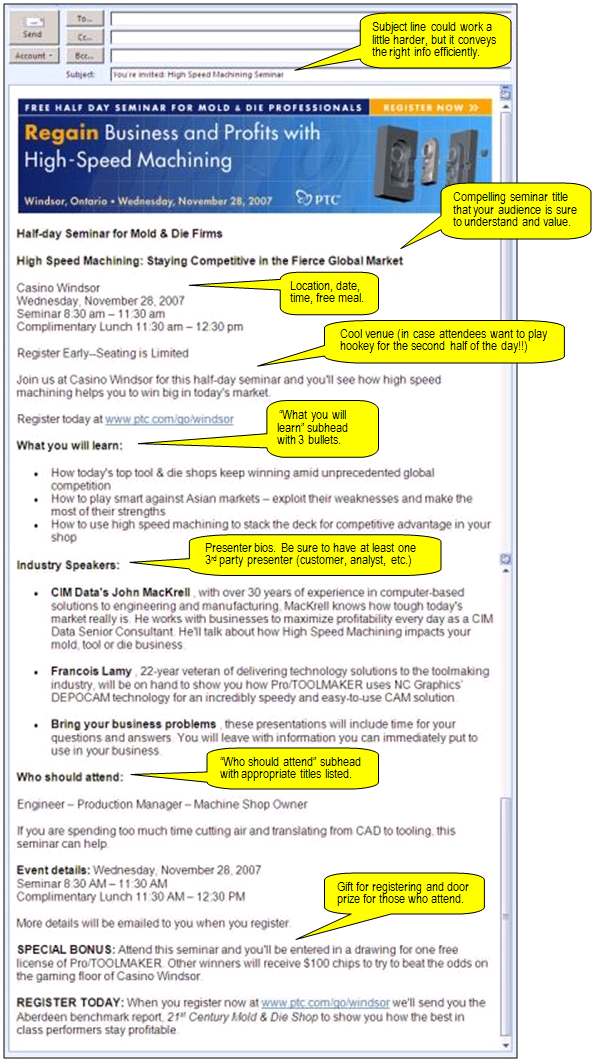
See this link for the anatomy of a good seminar invitation(or click the graphic on the left). It is an annotated example of a real seminar invitation that drove registrations for a successful seminar we conducted a few years ago. It follows a tried and true outline you can adopt for your own seminar invitations. Here are some best practices identified:

  • Create a compelling seminar title
  • Create a compelling email subject line
  • Include the logistics: date, time, location
  • Include a “what you will learn” section — that is the #1 reason why someone will register, and if they need to get permission from their boss this is what they will show them
  • Include 3rd party speakers — shows recipients that it is not just going to be a sales person talking at them
  • Include a “who should attend” section — overcomes any hesitation that this seminar might not be the right fit for the recipient of the invitation

Other General Tips:

  • Keep the content short and punchy (the example I linked above is probably a little too long, the logistics are repeated and the bios are a little longer than they need to be)
  • Use subheads & bullets to make it easy to read
  • Keep the tone of the invitation and the subject matter of your seminar educational (nobody wants to show up to a glorified sales presentation)
  • Use strong language for your call to action (register today)
  • Stick to half-day seminars because it is probably too much of a commitment for most business people to get out of the office for a full day
  • Include an exciting door prize if possible

To read more about selling the offer, check out this article: In B2B Direct Mail Lead Generation, Sell Your Offer, Not Your Offering.

Post your comments and let me know if I missed anything!

Posted in Copywriting, Email Marketing, Field Marketing, Seminar Marketing, VAR Marketing Techniques, Webinar Marketing | 2 Comments

Avoid Common Pitfalls for More Effective Sales Seminars — Part 2


In Part 1 of this post, I discussed the importance of having a good sales pipeline, building quality content, and allowing adequate time for promotion. I want to publish a few additional thoughts here.

1. Doing the Little Things Right Can Make a Big Difference
I had an interesting conversation with a regional sales director the other day. He mentioned door prizes, venue selection, and catering. Hey, without a doubt all these “little things” matter and they can add up to make the difference between success and failure. Here are some examples:

A. CATERING:
You can *increase registration* if you mention in your invitation that a meal will be served. For the title of your event, consider naming it a “Breakfast seminar…” and mention that a complimentary meal will be served.

B. DOOR PRIZES:
Including door prizes might increase registration, but it is even more important for *reducing your no-show rate.* Include a note in your confirmation and reminder emails that there will be prizes raffled off or give-aways for each attendee. Be specific about what will be awarded. That way, registrants will realize that if they no-show then they will miss out on something concrete and desirable.

C. REMINDERS AND CONFIRMATIONS:
While we are discussing *reducing your no-show rate*, it is absolutely critical that you remind your registrants of the upcoming seminar and confirm their attendance. Send a reminder email a day or two before the event to every person who has registered. Follow up with phone confirmation to make sure they are still able to come. While you are at it, ask them if anyone else in their organization would be interested in attending, it can be extremely valuable to get other members of the decision-making unit to attend, or at least capture their contact information. During your confirmation activities, be sure to have ready driving directions to the venue, and any information about parking (these are common questions you will get).

D. VENUE SELECTION:
Choose a venue that matches the theme and it may *increase registration.* If you are having an end-user “hands-on workshop” then it is OK to rent a standard function room at Holiday Inn. But that will not cut it for an executive audience. You need to go upscale and exclusive and “cool.” Choose a fancy restaurant, or an upscale hotel. Try something unconventional like renting out a museum space or art gallery or sports facility. I once held a seminar in Fenway Park (home of Major League Baseball’s Boston Red Sox) and it was a huge draw. Hold your event at a prominent customer’s headquarters. We have hosted seminars at the facilities of customers who are prominent NASCAR competitors and it always helps to draw a crowd.

Any other good examples? Please feel free to post them in the comments section below.

2. Knowing When to Pull The Plug on a Seminar That Will Fail:
I came across a good article called “Seminar Marketing – Seven Tips to Increase Attendance.” There’s a good discussion of timing your promotion, the importance of coming up with a good seminar title, setting realistic expectations about how many registrations you will get based on the size of the list you are promoting to, etc.

The post starts with this quote “I just delivered one of the best seminar presentations of my life,” said the professional. “Too bad only 6 people showed up.”

This should NEVER happen. It is not easy to admit failure. But it is sometimes better to gracefully cancel a seminar than to hold a seminar with low attendance.

Monitor your registration list. If you have less than 20 people registered within a week of your event you should strongly consider canceling your seminar. Remember you will have something like a 50% no-show rate, so 20 registrants will yield around 10 attendees. Depending on your room size, less than 10 people in attendance will probably be embarrassing and counterproductive — an empty room will convey to the audience members that nobody really wants to listen to what you have to say. It will make them question why they fell for it, when nobody else apparently did!

So if you have an unacceptably low registration rate it is better to cancel your seminar. Call up each registrant and make an excuse (our guest speaker had a family crisis and had to cancel, or something like that) and offer to come to them in-person and deliver the content. That is the best way to salvage the sales opportunity, and you might actually be able to recoup some of your event costs too (venue, travel, catering, etc.). That is taking lemons and making lemonade!

Please feel free to post examples of successes or failures, or additional tips.

Posted in Channel Marketing Best Practices, Field Marketing, Seminar Marketing, VAR Marketing Techniques | 1 Comment

Avoid Common Pitfalls for More Effective Sales Seminars

I know it is much more “vogue” these days to write articles about social media ;-)! But seminars are real meat-and-potatoes activity for resellers. So when it is not going well, there is a real problem.Resellers are constantly being pushed by sales management to do more seminars. It seems like a great idea: instead of doing a bunch of one-on-one sales calls, gang-up a bunch of sales calls together at once and call it a seminar. But I’ve seen enough resellers struggle to achieve good results with seminar marketing to know that it is not always that easy.

Let’s take a step back and make sure we understand how seminars fit into the marketing mix and how you can ensure their success:

1. Understand The Objective of a Seminar:
When VAR seminars are unsuccessful, the #1 reason why is that marketers, salespeople, and VAR principals misunderstand the objective of seminars within the marketing mix.

    • The objective of a seminar is NOT new lead generation.


  • The objective of a seminar is advancing pipeline opportunities already in progress.


A seminar probably won’t be your first point of engagement with a prospect, because a cold lead is probably not going to show up for your seminar. If your prospect has never heard of you, never downloaded your white paper, never expressed an interest in your solution, or never received an introductory sales call from you, they are probably not ready to attend your seminar.


2. Check Your Pipeline:

Your sales pipeline is the fuel that makes a seminar go. If you can’t name 10 pipeline accounts within 100 miles of your proposed seminar, then don’t do a seminar. Instead, do some lead generation marketing activities (rent a list and promote a white paper, demo, or Webcast). I’ll cover effective lead generation marketing in subsequent posts.

Remember, the primary objective of a seminar is to advance pipeline opportunities. If you don’t have solid pipeline opportunities then first you have to do the *prerequisite* lead generation work to build your pipeline. There’s no real shortcut here, folks. Your attendee list for your seminar will be derived primarily from sales calling into your pipeline, not from marketing emails or direct mail or banner promotion or social media posts.

Let me say that again: If you can’t name 10 pipeline accounts within 100 miles of your proposed seminar, then don’t do a seminar. Do lead generation instead.

3. Build Quality Content:
The days are long gone where you would jam a bunch of prospects into a room and then deliver the same sales presentation you deliver in one-on-one sales meetings. Wouldn’t it be great if it was that easy? If that ever worked, it doesn’t work today. In a tough economy it is not that easy for your prospects to justify time out of the office for something like this.

Build a quality agenda where the attendees will learn something valuable. Include guest speakers (customer case studies, industry experts, etc.). And make sure your marketing promotions highlight the quality and the value.

4. Begin Execution Well In Advance:
People are busy. Be respectful of that. Calling your sales prospect in a panic 2 days before your event and pleading with them to come to your seminar is not respectful of *their* busy schedule and *their* business priorities. I recommend that you…

  • Begin planning your seminar 2 months in advance of the seminar date. Get all the details sorted out: topic, agenda, date, time, & venue. These are the details you need for your marketing promotions.
  • Work hard to come up with a good seminar title — a compelling seminar title is the most important factor in getting people to register. Test it with your sales people, customers, and prospects to make sure it has perceived value.
  • Create your email. Make sure it highlights your valuable agenda. Include a section entitled “What you will learn” and use at least 3 bullets of key information you will cover. Be sure to mention your guest speakers — good guest speakers will increase your attendance. An HTML email is good for email blasting, but more importantly, create a OFT version of your email. An OFT email can be used by your sales people to send one-off emails to their individual pipeline contacts to invite them to the event. (If you don’t know how to create OFT emails, I’ll post a comment below with instructions on how to do it.)
  • Begin promoting your event at least 1 month in advance of your seminar date. This gives your prospects plenty of time to fit it into their schedule. It also gives you time to send out at least 2 waves of invitations — sometimes it takes more than one invitation to get the job done.
  • I’ll write some more about writing effective seminar invitations later.

PTC Resellers and Regional Marketers: I have compiled a bunch of helpful tips in our PTC Partner Portal: Log into the Partner Portal, under the Departments tab navigate to the Marketing page, then look for the “How-To / Best Practices” section. There is content here that includes planning guidelines, how to write effective invitations, and even good presentations and content you can leverage to build your seminar agenda.

Now that we are all on the same page about how seminars fit into the mix, PTC has all the tools to help you knock it out of the park!

Posted in Channel Marketing Best Practices, Seminar Marketing, VAR Marketing Techniques | 2 Comments

How do you fix bad VAR Websites? (Part 2)

In “Part 1” of this topic I identified what I mean when I say most VAR websites are a disaster (low, slow adoption of marketing assets; and outdated, out-of-brand product content). And I noted the reason why the websites are in such bad shape (VARs simply have too much stuff on their plate, so website maintenance tends to fall off the edge and get neglected).

So here’s the part where I answer the original question:

  • Question: How do you fix a bad VAR website?
  • Answer: You don’t. You fix all of them.

Website Content Syndication
Website content syndication allows PTC to create website content for the VARs and then stream it directly to the every VAR website.

  • Step 1: We take the key handful of marketing campaigns that every VAR should be deploying, and we stream them directly to every VAR’s website. We take core product content (standard description, PDF brochure, etc.), and we stream it directly to every VAR’s website.
  • Step 2: When PTC creates new marketing campaigns, PTC can swap them into the syndication feed and the content is instantly updated on every VAR’s website. When PTC releases Pro/ENGINEER Wildfire 6.0, PTC can swap out the Wildfire 5.0 content, and swap the new messaging and brochure into the syndication feed and the content is instantly updated on every VAR’s website.

Benefits for every VAR:

  • Liberates every VAR from the burden of website maintenance …so they can focus on other critical marketing priorities.
  • Populates each VAR website with professionally developed marketing and product content, to support their sales activities and to generate leads.
  • Easy to set up (one line of code pasted onto one page of the VAR website — this line of code accepts the syndication stream).
  • Ability for every VAR to manage the content that is syndicated to them (can opt out of content they don’t like, and can control the method by which leads flow to them).

Benefits for PTC:

  • No more out-of-date, out-of-brand content proliferated on VAR websites.
  • No more “whac-a-mole” exercise in chasing every VAR to adopt marketing campaigns and correct branding violations.
  • Massive distribution of our “pure” marketing and product content.
  • Liberates VARs from the burden of website maintenance …so they can focus on other critical marketing priorities.

Stay tuned to this space. My “Part 3” post will include live examples of this in action as we pilot this and roll it out.

Posted in Channel Marketing Best Practices, SharedVue, VAR Marketing Techniques, Web Content Syndication, Website Marketing | 1 Comment

How do you fix bad VAR Websites? (Part 1)

It’s a common complaint: “Our VARs’ websites are a disaster!” The typical problems are:

  1. VAR websites exhibit *low*, *slow* adoption of marketing assets
  2. VAR websites contain *outdated*, *out-of-brand* product content

I could show you several hundred examples of this. VAR websites showing Pro/ENGINEER Wildfire 4.0 content even though we released Wildfire 5.0 six months ago… VAR websites promoting a free trial program that we discontinued 12 month ago… VAR websites promoting “MathCAD” even though the appropriate product branding is “Mathcad”… It goes on and on. I would estimate that 1% of our VAR websites have strong product marketing info and compelling up-to-date marketing programs.

How do you fix it?
Really the only tools I have had to utilize (until now) are a combination of nagging, and awarding/withholding MDF (Marketing Development Funds):

  • Nag each VAR to add new marketing programs to their website every time a new program or asset is rolled out.
  • Nag each VAR every time a product is rev’ed. References to version numbers need to be changed; linked product documentation needs to be changed; and new functionality and positioning needs to be documented and promoted.
  • Award a VAR MDF funds to hire a web consultant to make the updates
  • Withhold MDF funds from a VAR until they get their website updated with appropriate content

These solutions are terrible. Nobody likes to be a nag, including me. The VARs simply have too much stuff on their plate, so website maintenance (and indeed many other marketing tasks) tend to fall off the edge and get neglected. And most VARs do not have dedicated, well-trained marketing headcount that can take care of projects like this.

Also, these efforts are all one-off. After nagging, cajoling, and bribing one VAR to get their website updated, you need to turn around and do it all over again for the several hundred other VARs who are exhibiting problems. And then 6 months later you need to go back to that same VAR and do it all over again.

Yesterday I kicked off a project with a company called SharedVue which I believe will solve this problem. Stay tuned to this space to learn more about it.

Posted in SharedVue, VAR Marketing Techniques, Web Content Syndication, Website Marketing | 3 Comments